Skip to content
Customers & CRM

Know your customers and their history.

Bring contact details, addresses, purchases and credit together in the customer profile. Your team can find individuals and businesses and provide service with the right context.

Part of your Lonio platform. Connected to your workflows.
Personal customer service in a salon
Contacts, purchases and credit together.
Customer management#104
MK
Customer profile 1044 visits · Customer since 2025
Returning customer
Appointment · ConsultationToday, 10:00
Product purchaseCeramic mug · €29.00
Gift cardBalance · €50.00
Illustrative product view · Sample data
Individuals & businesses
Orders & history
Addresses & customer accounts
BUILT FOR YOUR DAILY WORK
CUSTOMERS & CRM
01 / CUSTOMERS & CRM

Profiles & contact details

Keep details available where service, billing and delivery need them.

  • Find individuals and businesses by name, email or phone number
  • Manage billing, shipping and company addresses with defaults
  • Maintain language, time zone, VAT number and customer tax settings

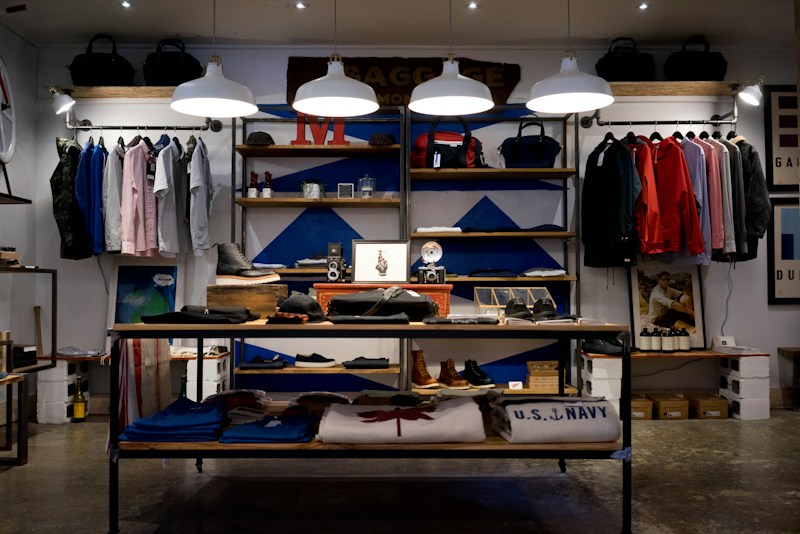
Customer advice and sales in a clothing shop.
IN EVERYDAY BUSINESSKeep customer information together for advice and service.
02 / CUSTOMERS & CRM

Orders & relationships

See each customer interaction in the context of actual purchases and outstanding activity.

  • Review purchase count, total value, and first and latest orders in the purchase summary
  • Access orders, open baskets, credit and gift cards
  • Trace notifications and resend them when needed
03 / CUSTOMERS & CRM

Customer accounts & self-service

An enabled customer account makes important details and documents accessible to your customers.

  • Configure registration, email confirmation and sign-in for your business
  • Provide access to profiles, addresses, orders, payments and invoices
  • Enable reordering and return requests according to your setup
CONNECTED IN PRACTICE

One customer interaction, with the relevant details.

A returning business customer orders again. Their profile connects their details with previous purchases and the new order.

Customers & CRMProfile open
CustomerStudio North
TypeBusiness
Customer numberC-104
The conversation starts with the right customer profile.

Find the customer

Search by name, email or phone number and open the existing profile.

Example workflow with illustrative data.
EXPLORE THE CAPABILITIES

A customer profile with your business context.

Connect contact and company details with orders, credit and customer accounts, so your team can answer questions using the relevant transaction.

Customers & CRM

Keep customer information ready for sales and service.

Keep personal and business details structured and usable for each transaction.

Individual or company

Maintain contact details, language, time zone, date of birth and VAT number, and find customers with relevant search filters.

Address book with defaults

Manage billing, delivery and company addresses, with default addresses and a configured display format.

Tax class and customer assignment

Assign the appropriate customer tax class. Customer assignment can also be updated on an existing order.

Customers & CRM

Understand customers through their actual purchases.

See more than contact details: review the business relationship and outstanding activity.

Purchase summary

Review purchase count, total and average value, together with the customer’s first and latest orders.

Orders and open baskets

Access completed transactions and open baskets directly in the customer context.

Provide messages again

Notification history shows earlier messages and supports resending when a customer needs a communication again.

Customers & CRM

Explain available balances clearly.

Keep store credit and gift cards available alongside the purchase relationship.

Customer wallet

View store credit and associated gift cards together to answer questions about the next redemption.

Support returns

Customers can request returns through their configured account and follow the processing status.

Protect existing history

Customers with credit or business history are protected against deletion so associated transactions remain available.

Customers & CRM

Let customers handle suitable tasks themselves.

Complement personal service with a configured customer area in your shop.

Documents and reordering

Provide access to orders, payments and invoices. Reordering can be enabled from the customer account.

Keep personal selections

Customers access wishlists, saved baskets and their reviews. On sign-in, the guest basket can merge with the customer basket.

Configure sign-in

Configure registration, email verification and password recovery; social sign-in and two-factor authentication extend account access.

IN YOUR INDUSTRY

Customer context for advice, service and repeat visits.

The next interaction is more useful when your team understands the existing relationship. Use profiles alongside actual purchases and open activity.

All industry solutions
Explore how it works for your business6 industry groups35 example business types
Retail interior as an example setting
Customers & CRM

Retail

HOW YOU CAN USE IT

Purchases and customer accounts together

Access earlier purchases, addresses and available balances in the customer profile. Give your team the relevant transaction when advising customers or answering questions.

  • Purchase history from store and shop
  • Maintain billing and delivery addresses
  • Check gift cards and credit
Restaurant as an example setting
Customers & CRM

Food & hospitality

HOW YOU CAN USE IT

Support regulars and business customers

Keep guest and company contacts alongside their orders. Find returning catering and collection customers with their previous purchases.

  • Company addresses for catering invoices
  • Retrieve previous orders
  • Provide documents in customer accounts
Stylist working with a customer as an example setting
Customers & CRM

Beauty & wellness

HOW YOU CAN USE IT

Customer context for the next visit

Connect contact details with purchased treatments and care products. Associated gift cards and credit remain visible for the next purchase.

  • Review service and product purchases
  • Maintain contact details and language
  • Explain available gift-card value

Find your business type

Explore the relevant industry solution
Hotel as an example setting
Customers & CRM

Accommodation

HOW YOU CAN USE IT

Distinguish guests from billing contacts

Maintain individual and business customers with appropriate addresses and language details. Use customer records to identify the relevant orders and documents.

  • Record company addresses for business guests
  • Keep language details in customer profiles
  • Find invoices and purchases

Find your business type

Explore the relevant industry solution
Bright office interior as an example setting for professional services
Customers & CRM

Services & trades

HOW YOU CAN USE IT

Connect business clients and their orders

Manage individuals and companies with billing addresses and VAT numbers. Review existing orders and open baskets directly in the customer record.

  • Manage individual and business clients
  • Set default billing addresses
  • Access client orders and documents
Fitness studio as an example setting for training and services
Customers & CRM

Education & fitness

HOW YOU CAN USE IT

Connect customer details and service purchases

Keep contact details alongside purchased tuition or training services. Documents and available credit help answer questions about previous purchases.

  • Review purchases of training sessions
  • Keep billing addresses up to date
  • Check credit in the customer wallet

Find your business type

Explore the relevant industry solution
GOOD TO KNOW

Your questions.
Clearly answered.

Discuss your requirements

Yes. Customers can be managed as individuals or businesses, with contact details, language, tax information and an address book for billing, shipping and company addresses.

PLAN YOUR NEXT STEP WITH US

See how it works for your business.

Explore the right features with our team and discuss your setup.

THE LONIO MARKETPLACE

Your offering.
Eight industries.

Present products and services on lonio.com. Explore the marketplace from your customers’ perspective.